








UltraEdit 2025.2 featuring: Improved EDI support and experience, live find and replace matching, and UC/UFTP updates!
UltraEdit 2025.2 is here—and it’s got company! This major release for the text editor comes bundled with fresh updates for UltraCompare and UltraFTP. And even if you use only one or all of these tools, the benefits will come across whether you’re editing code, comparing files, or managing server connections.
Users can expect a more focused update, with each change rooted in user feedback and needs.
-
- For the UltraEdit text editor, this update improves upon major additions recently added to the text editor such as more improvements to EDI editing and viewing capabilities, enhancements to the Find & Replace experience, and general bug fixes and performance tweaks.
- For the UltraCompare diff tool, users can now enjoy the same benefit of the Pieces AI integration added to UE at the beginning of 2025. FTP protocols have also been updated to the latest standards. A new configuration is added to choose which FTP component is used for maximum server compatibility.
- For the UltraFTP users, users can now enjoy direct SSH/Telnet server access via the console terminal window. Similarly to UC, FTP protocols have also been updated with the new configuration option, too.
UltraEdit & UEStudio 2025.2: Enhanced editing capabilities
The changes to UltraEdit are based on our prior commitment to key development areas and user feedback, especially on changes added in recent releases.
Improved EDI file support for data interchange workflows
In 2025.1, we added built-in support for EDI and reconfigured the default settings to make it easier for our users in healthcare, logistics, finance, or supply chain management. In this release, we further improved the experience by tweaking existing behavior and adding support for the most popular international standards.
- New wrap/unwrap functionality
Electronic Data Interchange (EDI) is a standardized format for exchanging business documents between organizations—purchase orders, invoices, shipping notices, and healthcare claims all rely on EDI formats.
Many of our users share similar pain points with viewing and editing EDI— with the most common being difficulties in the structure. EDI data streams don’t include line breaks—the entire file is one continuous string of information. This makes manual reading and editing EDI files unnecessarily difficult.
UltraEdit 2025.2 introduces a simple solution. Navigate to Coding – EDI Functions and you’ll find new wrap and unwrap commands specifically designed for EDI files.
When you unwrap an EDI file, UltraEdit intelligently finds the segment terminator and replaces it with a line break (like ^p in some editors), putting each segment on its own line for significantly better readability. You can reverse this by using the re-wrapping function.

Converting raw (left) EDI data to formatted and syntax highlighted text (right). Open a file , run the unwrap function, and you will get the right image.
- Improved syntax highlighting
Additionally, the individual lines are now displayed with improved syntax highlighting for better readability. Each record/field is broken out on separate lines when unwrapped and record identifiers are color-coded, helping you quickly locate specific segments within the data.
The improved highlighting makes the structure immediately clear so you can quickly make your edits. Make your edits, verify your changes, and when you’re finished, simply wrap the file back to its original format. The entire process is reversible and preserves the integrity of your data.
- Support for X12 (US standard) and EDIFACT (international) standards
The above changes are supported in the two main standards for EDI. X12 (the standard originating in the United States but also used globally) and EDIFACT (the international standard focused on cross-border transactions).
Whether you’re working with domestic or international trading partners, UltraEdit handles both formats seamlessly.
Live highlighting in Find and Replace
UltraEdit’s find and replace is a bread-and-butter feature for many users—whether you’re finding a specific variable in code, replacing terminology across documentation, or writing complex regular expressions, it needs to be clear what you’re currently matching.
With this change, matches found while a user types in the advanced find and replace dialog (Ctrl + F, F) are immediately highlighted in your document. It’s a very similar behavior to quick find (Ctrl + F) but is now more encompassing by including more complex searches like longer strings and scattered matches.
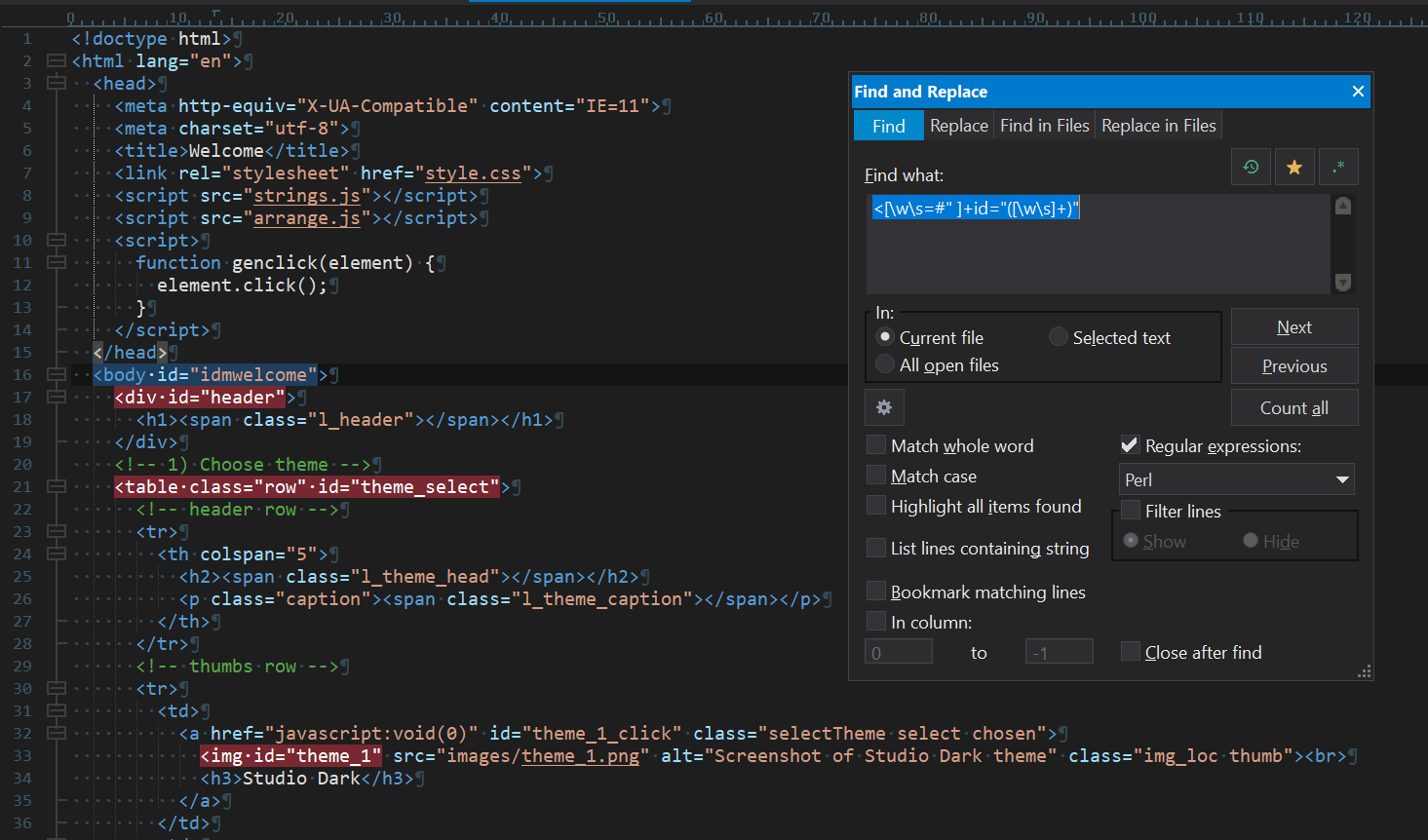
Find/Replace live highlighting with regular expressions
Protip: This feature particularly shines when working with regular expressions. Regular expressions are powerful but can be tricky to get right. A single misplaced character changes what you match.
With live highlighting, you see exactly what your pattern captures and you can trial and error your way into the correct expression easier.
UltraCompare 2025.0: Pieces integration + FTP update
Updated FTP support and protocols
We’ve brought the FTP protocol enhancements from UltraEdit 2025.1 to UltraCompare and UltraFTP. This includes updated cipher support, modern key exchange algorithms, and improved hash functions for secure file transfers.
The updated FTP component provides broader compatibility with modern servers while maintaining backward compatibility with existing accounts through a legacy fallback toggle. Here’s a rundown of what’s new:
- Expanded cryptographic support with modern key exchange and signature algorithms, including ECDSA variants (ecdsa-sha2-nistp256 / 384 / 512).
- Improved compatibility with current server requirements, adding support for rsa-sha2-256, rsa-sha2-512, ed25519, and advanced cipher modes like chacha20-poly1305.
- More reliable connections, especially for environments that previously experienced intermittent issues with ED25519.
- Configurable legacy fallback, preserving backward compatibility with existing FTP/SFTP accounts through an intelligent legacy component toggle. (More on this below)
Configurable FTP component selection
To ensure maximum compatibility across diverse server environments, we’ve added a new FTP component setting that puts you in control. You can now choose between our updated FTP component with modern protocol support and our traditional component for legacy server compatibility.
This dual-component approach means you’re never locked out of a server—connect to cutting-edge systems with the latest security standards, then switch to the legacy component for older infrastructure that requires traditional protocols. Component selection is available in FTP account settings under the Advanced tab:
- Select UltraEdit.wodFtpDLXComUE.1 (current) for latest FTP features and modern protocol support
- Select UltraEdit.wodFtpDLXCom.1 (legacy) for maximum compatibility with older servers
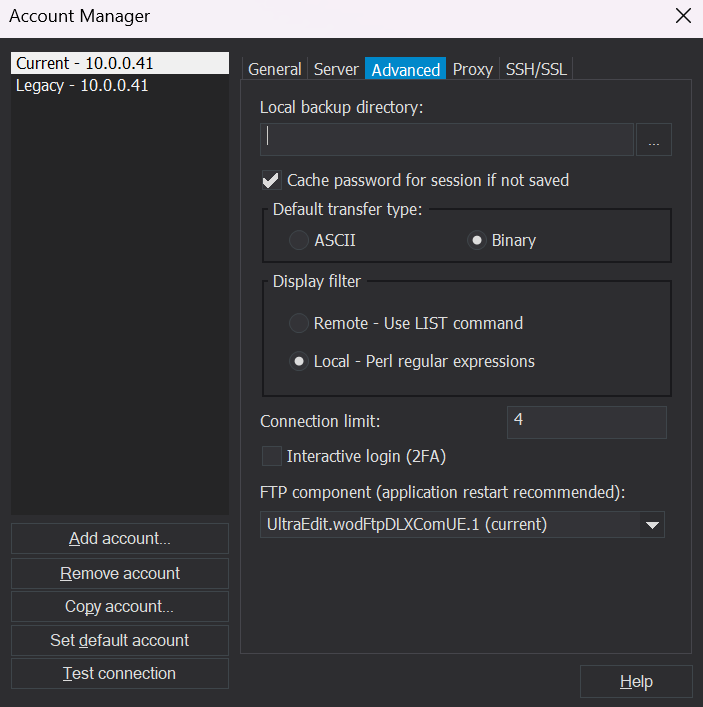
Account manager and advanced component selection
New accounts default to the current component, while existing accounts automatically continue using the legacy component to ensure your workflows remain uninterrupted.
Pieces AI integration
UltraCompare gets a huge powerup in this release with the addition of the Pieces for Developers plugin bringing AI features to your favorite diff tool.
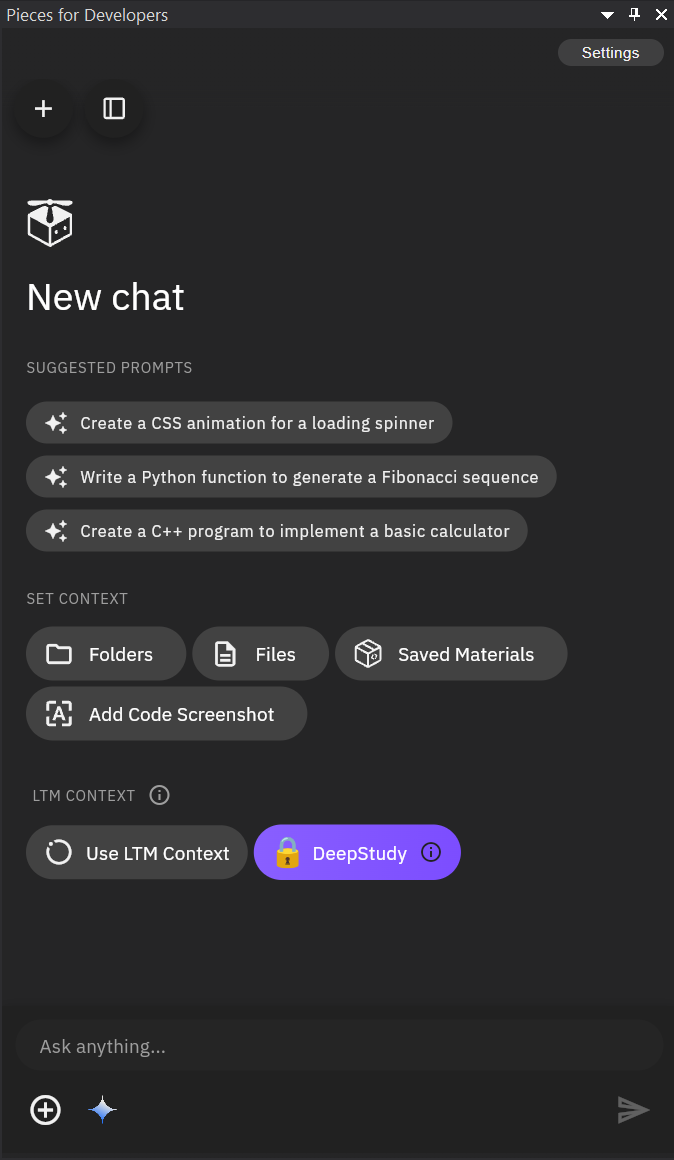
Pieces for UltraEdit was added in 2024.2 which provided users with a developer workflow assistant (or copilot) that put a dockable chat window inside UltraEdit.This plugin works similarly for UltraCompare and acts as if you had a copilot with the context of the files you are diffing.
You can feed it data or code, then you can ask it questions about your compares, or query it for summaries. You can also:
- Understand changes faster — Ask why a block changed, what a diff means, or whether it’s safe to merge.
- Summarize changes — Generate human-readable summaries for commits, PRs, or release notes directly from the diff.
- Spot bugs and risks — Apart from differences, have AI go through diffs for logic errors, edge cases, regressions, or potential security oversights.
- Resolve conflicts smarter — Ask for suggestions on which version to keep and why during merge conflicts.
Note: As with UE, Pieces is a completely optional plugin that you can choose not to install for whatever reason you may deem necessary.
UltraFTP 2025.0: More powerful server management
For users who rely on UltraFTP as their primary file transfer tool, this release provides new ways to improve your workflow and setup.
Direct server admin
UltraFTP now includes an SSH console that lets you connect directly to your servers via command line. It’s the same terminal interface you’d use in a standalone SSH client, but integrated directly into your file transfer workflow—this makes account management more straightforward.
Configure your SSH/Telnet connections the same way you configure FTP accounts, then connect with a single click.The power of this feature is more apparent when you consider real-world server administration tasks.
- Upload a batch of files to your server via FTP. Then immediately switch to the SSH console to set permissions, restart services, or verify the files deployed correctly. No need to open a separate terminal application, re-authenticate, or navigate to the right directory—all via keyboard on the same window.
- Or work in reverse: connect via SSH to prepare your server environment, then use FTP to transfer the files. All within a single application, streamlining routine tasks that previously required switching between multiple tools.
Updated FTP support and protocols + configurable component selector
UltraFTP’s new SSH console uses SSH key agents, if present, when logging in to SSH hosts. A key agent centralizes and simplifies public/private key management by loading keys and prompting for required passphrases. Once loaded the keys can be used by any application that supports the key agent protocol.
As with the UltraCompare update, UltraFTP also gets an update to the list of supported protocols and file transfer standards. It now also leverages industry standard OpenSSH tools, included with Microsoft Windows, to support the latest encryption standards and features, like SSH forwarding, while also ensuring timely security and protocol updates.
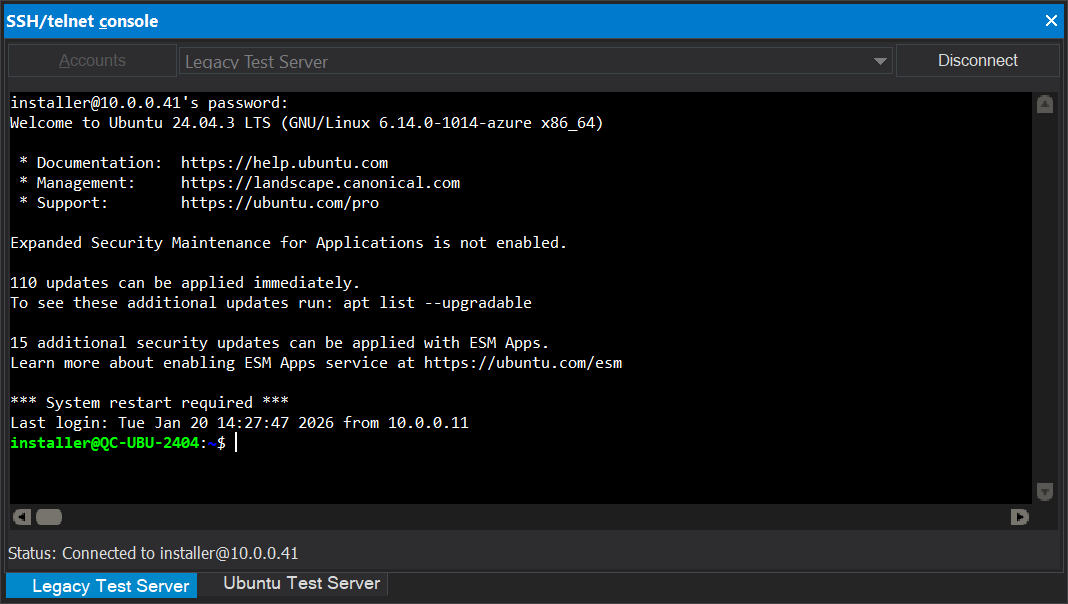
SSH/Telnet console accessing remote test server
This provides broad compatibility updated with modern servers standards while maintaining backward compatibility with existing accounts. Here’s the recap of updated protocols if you can’t be bothered to scroll up (not your fault):
- ECDSA support: ecdsa-sha2-nistp256, nistp384, nistp512
- RSA SHA-2: rsa-sha2-256, rsa-sha2-512
- ED25519 compatibility improvements
- Modern ciphers: chacha20-poly1305
As with the UC update, you can also use a new configuration option to choose which component standard is utilized in order to ensure compatibility with newer servers or if you’re on a legacy project.
Other notable improvements and bug fixes:
- Other notable quality improvements and fixes (UE/UES)
-
- Improved tab sizing/handling, text selection, and general editing when using column mode with proportional and fixed-width fonts
- Improved product stability on startup with certain configurations
- Lines at end of file seem to disappear after using ALT+SUBTRACT
- File name is replaced by selected folder name when navigating “Save to FTP” dialog
- Updated default language template files with minor additions and corrections
- Updated default tags list with minor additions and corrections
- Make context menu work in FTP open/save dialogs when clicking below directory listing
- Fixed unable to connect to legacy mainframe server
- Fixed Hex Copy Selected View broken
- Fixed “Invalid data received from remote server” error with FTP
- Fixed Customer cannot connect via SFTP
- Fixed cannot load a macro containing JSONFormatDocument
- Fixed hang/crashes when trying to open large file from Z/OS mainframe
- Add support for OPENSSH format private key for SFTP
- Fixed sorting of identical content in different columns doesn’t yield same result when TABs exist in document
- Fixed cursor not displayed as expected from active line/column highlighting
- Fixed line/column position is indicated incorrectly in status bar in lines with tabs
- Fixed FTP log window not shown when working with only Cloud Storage accounts
- Fixed FTP Browser – Deleting folder from remote folder tree, succeeds, but does not remove it from the tree control
- Fixed FTP Browser – Deleting folder from remote file list does not remove folder from remote directory tree
- Fixed “&” is shown as \u0026 in folder name in FTP Open dialog
- Fixed Output window shown when connecting using FTP Open
- Fixed selection shifts unexpectedly after editing & saving
- Fixed column number indicated in ruler does not match line/col position shown in status bar
What’s next
The EDI unwrap feature in this release is a continuation of what we began in 2025.1 with even more potential future enhancements. We’re exploring the possibility of an EDI Manager—similar to our existing XML Manager—that would provide a dedicated interface for working with EDI files without needing to unwrap them first.
For regular expression users, we’re also considering an enhancement to the live highlighting feature: color-coded display for captured groups. This would make it even clearer which parts of your match are being extracted when you use parentheses in your regex patterns.
These are areas we’re actively discussing, but as always, our development priorities evolve based on user feedback and practical needs—so let us know if this interests you!
Download UltraEdit 2025.2 today and experience enhanced productivity with improved EDI and search experience.
UltraEdit 2025.2, UltraCompare 2025.0, and UltraFTP 2025.0 is available immediately for Windows, with macOS and Linux to follow with an update planned in the first quarter of 2026. Existing users can update through the application or download from the download page.



Is this a free upgrade?
Hello Alan,
Upgrades have since been discontinued and replaced by renewable maintenance.
Please contact sales to see your options for obtaining the latest version.
While no longer available for purchase, UltraEdit will always honor unlimited lifetime upgrades for the customers who purchased them.